Standing Desk Calorie Calculator
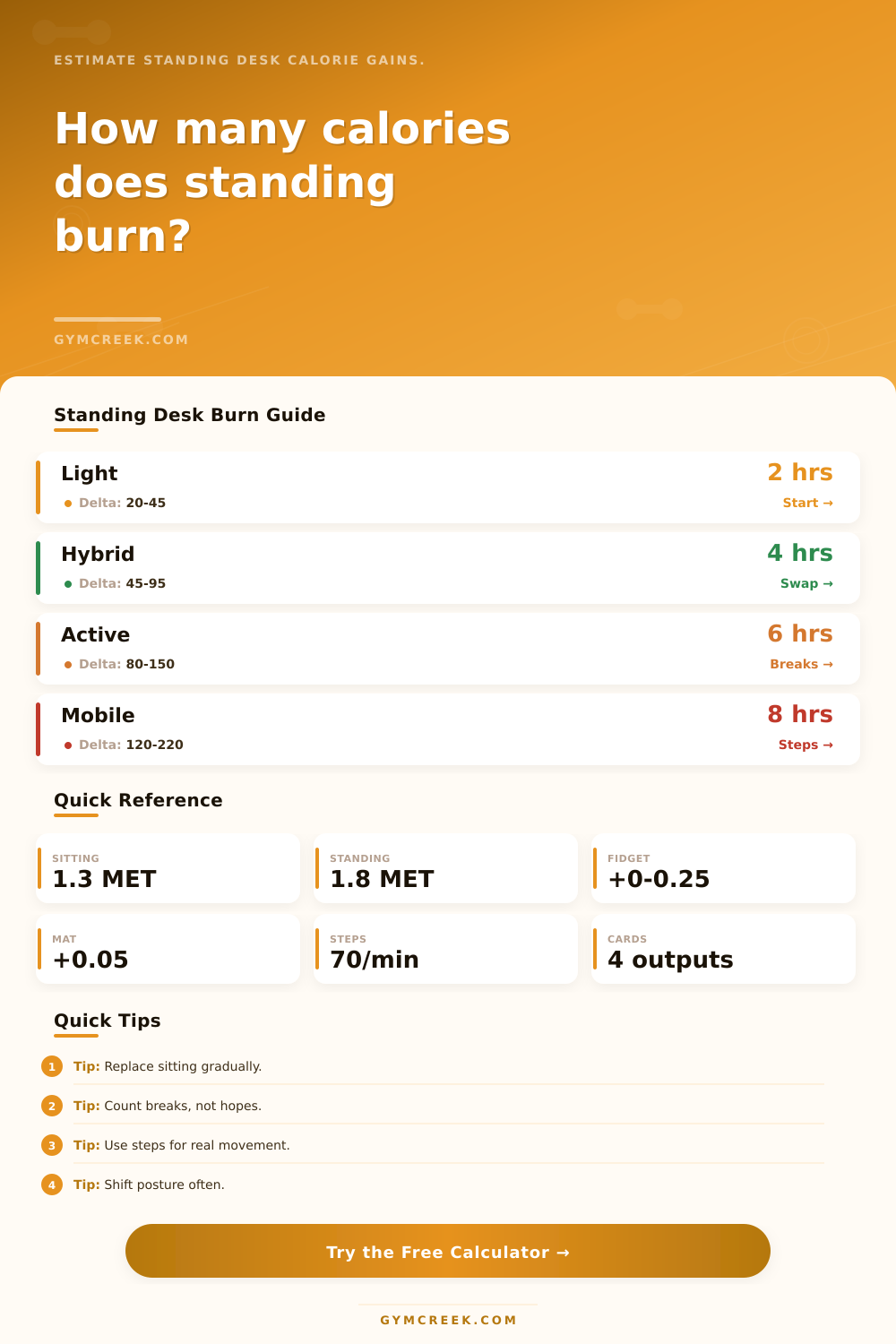
Estimate the net extra calories from replacing sitting with standing, adding microbreak steps, shifting fidget level, and using an anti-fatigue desk mat.
📌Presets
Each preset loads realistic standing hours, sitting replacement time, body weight, fidget level, mat use, and microbreak steps.
⚙Calculator
Standing desk calorie snapshot
Enter standing hours, replaced sitting time, microbreaks, and body weight to estimate net extra calories.
🧮Formula Cards
MET x 3.5 x kg / 200 x minutesStandard exercise physiology estimate for gross calories.adjusted standing MET - sitting METThe net gain only comes from time that replaces sitting.(walk MET - stand MET) x kg x timeBreaks are counted above the standing baseline.net daily kcal x desk days/weekUseful for routine planning, not a fat-loss promise.📊Standing Desk Metrics
📑Reference Tables
| Work Pattern | MET | Calculator Role | Practical Read |
|---|---|---|---|
| Quiet sitting | 1.2 | Lower baseline | Passive seated work |
| Desk sitting | 1.3 | Default baseline | Normal computer work |
| Still standing | 1.6 | Low standing mode | Minimal shifting |
| Normal standing | 1.8 | Default standing mode | Common desk posture |
| Light shifting | 2.0 | Higher standing mode | Weight shifts often |
| Active standing | 2.2 | Upper desk mode | Frequent movement |
| Office walking | 2.5-3.5 | Microbreak mode | Short moving breaks |
| Replacement | Net Kcal | Standing Kcal | Read |
|---|---|---|---|
| 2 hr | --- | --- | Light |
| 4 hr | --- | --- | Hybrid |
| 6 hr | --- | --- | High |
| 8 hr | --- | --- | Long |
| Break Pattern | Per Hour | Model Effect | Best Fit |
|---|---|---|---|
| None | 0 | No movement bonus | Short blocks |
| Hourly reset | 1 | Small step bonus | Deep work |
| Pomodoro lap | 2-3 | Moderate bonus | Knowledge work |
| Call walking | 4-6 | High bonus | Meeting-heavy day |
| Restless pacing | 7+ | Very high bonus | Active desk user |
| Preset | Standing | Breaks | Profile |
|---|---|---|---|
| Two Hour Starter | 2 hr | Low | New user |
| Hybrid Office Day | 4 hr | Moderate | Balanced desk |
| Developer Flow Block | 3 hr | Low | Deep focus |
| Call Heavy Manager | 5 hr | High | Meeting day |
| Active Trader Desk | 6 hr | High | Frequent shifts |
💡Ergonomic Tips
You get a standing desk because you think sitting makes you lethargic. You dream of the day when you stand up and magically feel energized again. Your metabolism revs up and your afternoon slump are cured. Sorry to burst your bubble, but real life is messier.
Yes, your body does burn more calories while you’re standing as opposed to sitting. But it’s still not magic. It’s just a small rise in energy use that doesn’t amount to much unless you maintain that posture long enough. If you compare standing with sitting, it’s about one-half of a metabolic equivalent per hour. That sounds like nothing, until you scale it up: times eight hours times seven days a week.
How Standing Desks Help You Burn Calories
You enter your weight, number of hours stood, and how many of those hours replace sitting. Then the calculator do all the rest (see above). Note this difference. You won’t get credit for the full four hours if you’re standing four hours and sitting four hours. That is only a net gain. The tool takes into account this variable: it lets you say what you’re replacing with standing.
It also considers whether you use a mat, fidget, or take microbreaks, the little things that change a static statue into someone who works on their feet. Everyone tends to discount these little motions as unimportant. They think movement is irrelevant and that posture drives everything. It doesn’t. Movement is.
There is a fidget factor. Burning that extra energy by tapping your foot or shifting your weight may seem inefficient. But it’s only slightly more efficient than just standing there. After all, you’re still standing rather than sitting. You can choose a level of fidgeting on the calculator, from perfectly still to very fidgety, which adds a tiny metabolic bump that matches how you behave in the real world.
Are you walking around to fetch water every twenty minutes? Do you pace when on the phone? Those little interludes of true motion, the microbreak bonus shown at the bottom of the results page, represent actual locomotion, and they’re what powers up calorie burn. It is not the verticality alone.
This gets into the support of anti-fatigue mats. While these don’t somehow magically make you burn X more calories per hour, if standing hurts too much, then you get off your feet earlier than normal. The tool includes a small adjustment for mat usage because more comfort means more time on your feet, which leads to better results. If no mat, maybe you’ll fatigue faster and sit down sooner. Mat help keep you up longer and maintain that metabolic difference at work. Small thing but important when hitting a target number each day.
The second big factor in this equation is your body weight. It requires more calories to carry around and sustain more mass; hence why heavier people tends to burn more calories doing the exact same thing. To account for that, the calorie calculation is changed by the standard metabolic equations so that it’s personalized (not generic). So if you’re keeping track of things, your calculations will update with every pound you lose or gain. For example, when your body weight goes down, your body will burn fewer calories for the same amount of time standing. That can be counterintuitive. Don’t worry, though: it’s not that you did something wrong, it’s just the way physics works. This might require standing longer, doing it more intensely, or both to maintain your caloric deficit. This is illustrated in the reference tables on the page that outline the impact of various types of work on output.
The standing advantage shrinks if you are already moving a lot while seated. Net gain depends on whether it’s alert vs. The baseline is quiet sitting. How much are you moving around when seated? Standing benefit decreases if you’re moving quite a bit while seated. That’s why the tool asks about your sitting baseline so it doesn’t overestimate its benefits to you. Just because you stand for an hour doesn’t mean that’ll be all net gain. What if your baseline of sitting had you moving around a bunch too? Then the calculator takes that into account, and gives you a realistic look at what you’re actualy getting above your current state.
A standing desk isn’t some kind of miracle fat loss gizmo. It’s a tool to break your static posture. Calories are accumulated slowly, but they do accumulate. What I’ve found most valuable is that it interrupts sedentary behavior. When you use the tool to figure out what the weekly result will be, then see how little changes each day compound, it makes abstract goals concrete. And you begin to realize that doing two hours here and there doesn’t work as well as four hours of consistant, active standing with breaks. See? Math makes strategy obvious. No more guesswork.
Now we’re going to plan. Not only is standing not about height, it’s about movement.