Gait Speed Calculator
Estimate walking speed, pace, mobility category, cadence, and protocol confidence from a timed gait test, with unit conversion and gait-specific context.
📌Gait Test Presets
Presets load realistic timed-walk scenarios. Keep the same walkway, start type, device, and surface when comparing repeat tests.
⚙Calculator Inputs
Gait speed snapshot
Enter a timed walking distance and elapsed time to estimate gait speed.
📊Metrics Comparison Grid
📘Reference Tables
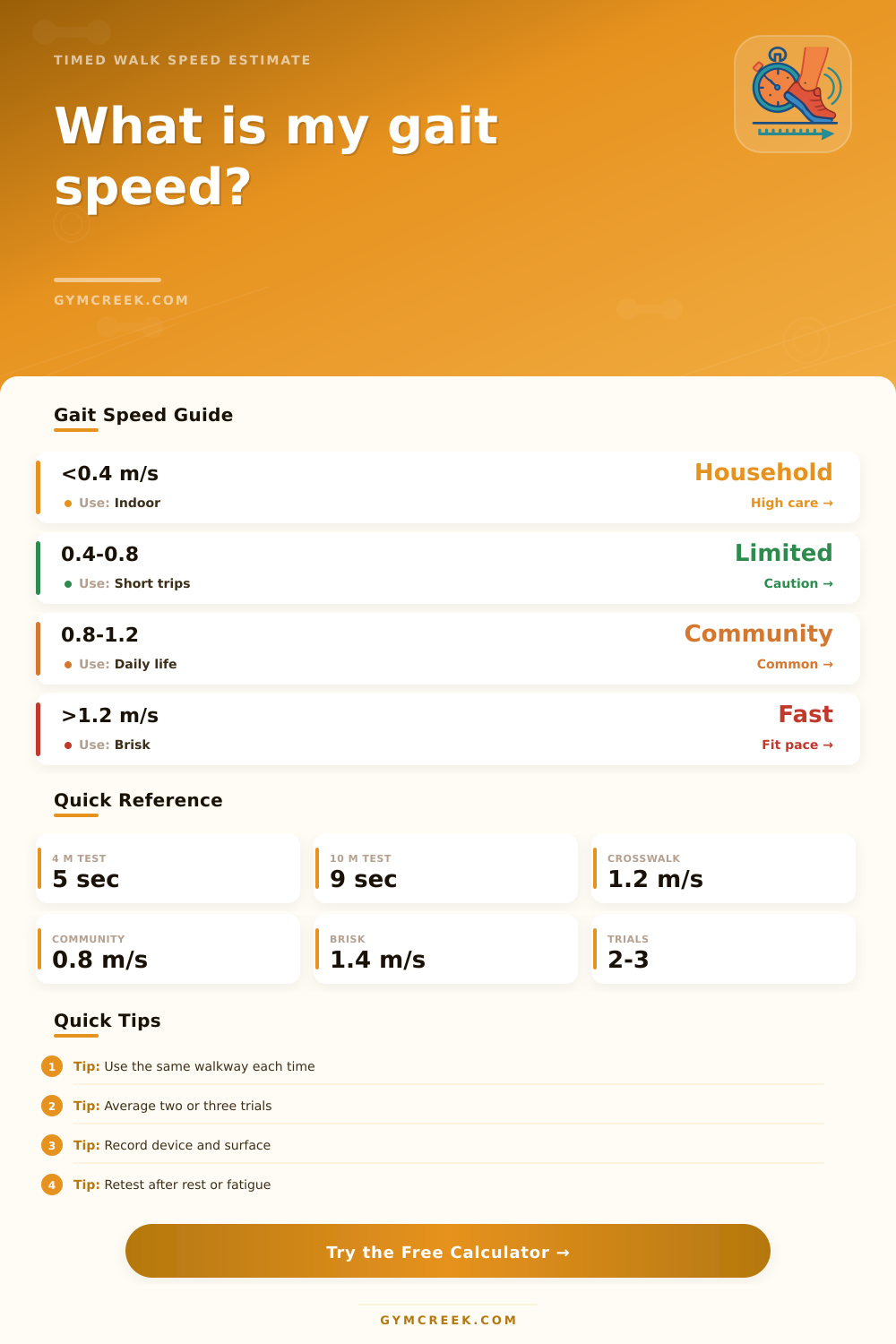
| Measured speed | Common category | Typical interpretation | Retest note |
|---|---|---|---|
| Under 0.40 m/s | Household range | Often limited to short indoor walking | Use close supervision when needed |
| 0.40 to 0.79 m/s | Limited community range | May handle short community distances | Track device and surface carefully |
| 0.80 to 0.99 m/s | Community threshold | Often used as a practical daily-life marker | Repeat with the same protocol |
| 1.00 to 1.19 m/s | Solid community pace | Usually supports normal walking errands | Compare usual and fast tests separately |
| 1.20 m/s and above | Fast community pace | Often near common crosswalk planning speed | Confirm if the test used a flying start |
| Protocol | Timed zone | Start style | Best use |
|---|---|---|---|
| 4 meter usual pace | 4 m | Standing or rolling | Clinic screening and repeat checks |
| 5 meter usual pace | 5 m | Standing | Short hallway or home setup |
| 6 meter walk | 6 m | Standing | Longer short-distance estimate |
| 10 meter walk test | 10 m | Timed middle zone | Usual or fast speed comparison |
| Custom walkway | Any measured zone | Record clearly | Personal tracking when space is limited |
| m/s | ft/s | km/h | mph |
|---|---|---|---|
| 0.40 | 1.31 | 1.44 | 0.89 |
| 0.80 | 2.62 | 2.88 | 1.79 |
| 1.00 | 3.28 | 3.60 | 2.24 |
| 1.20 | 3.94 | 4.32 | 2.68 |
| 1.40 | 4.59 | 5.04 | 3.13 |
| Metric | Formula | Needs | Limit |
|---|---|---|---|
| Gait speed | Distance / time | Measured zone and seconds | Timing error matters on short tests |
| Cadence | Steps / minute | Step count and time | Leave blank if steps are unknown |
| Step length | Distance / steps | Step count over the timed zone | Stride pattern may vary by turn or surface |
| Pace | Time per distance | Speed conversion | Very slow speeds create large pace numbers |
| Confidence | Protocol checklist | Trials, start, surface, device | Not a clinical diagnosis |
💡Gait Measurement Tips
A stopwatch is a liar. It is not out of malice, but indifference. Lose a single second to a brief pause or gain one from taking an extra stride. Suddenlly, that little hallway test will distort the short distance measurements enough to change how you see yourself while moving.
So while measuring the steady pace of your walk might require only a stopwatch and a hall, understanding its importance. What that number says about your mobility day-to-day, require a little more detail. Because gait speed is frequently referred to as the sixth vital sign: It’s a harbinger of falls, of hospital stays, and ultimately death itself. In its prediction, it strips away the guesswork of how someone feels and replaces it with hard data on how they move through the world.
Why Walking Speed Matters and How to Measure It
Next consider the protocol you use. A 10 meter hall test isn’t comparable to a 4 meter clinic walk. Because short runs exaggerate the effect of any timing error, a half-second time difference on a 4m run will have a dramatic impact on calculated speed. Running longer rounds off those sharp corners and lets you see what your actual walking looks like in its natural state.
This affects how much weight each of these puts into their tools, which let you pick the starting method and distance you actually want to measure. For example, did you stand still and then run? Or were you running already when you crossed over the line? That makes a huge difference, a standing start incorporates acceleration, which is very much a separate ability compared to being able to cruise along at an even pace.
Choose the one that reflects your goal: If it’s important for you to cross the street safely, the flying start matters more. If it’s getting up off the couch and going places, the standing start is honest metric.
The other part is context. How fast you walk depends not only on how far you go, but also on where you are. Walking on carpet drains speed compared to a hard gym floor. You may have slowed down because you use a cane (or walker), but that doesn’t mean you’ve lost mobility. It just means you adapted. That’s why the table on the page breaks speeds down into buckets (full community, limited community, household), which makes it clear that being in one of these bucket is not a failure. It is the right answer for where you currently are.
Many people think they should be walking at a fast community speed. They might not realize that the real prize for them would be to maintain where they’re currently at with age. With the bucket they can set goals that match their reality.
The raw speed number adds more depth when combined with cadence and step length. Your step count tells you the rhythm (cadence) as well. And if you’re still getting in a lot of steps while going slower, that means you may be shuffling your feet and taking short steps which can signal stiffness or caution. Or maybe you are taking long strides at a lower frequency, which is another kind of mechanical pattern.
The step count input allows the calculator to take all those factors into account. It helps differentiate between someone who’s slowing down because they’re tuckered out versus someone who’s slowed down due to a change in their mechanics. That difference could matter when training or rehabilitating.
Don’t confuse a lazy stroll on a beautiful day with a tired test after therapy. A stroll doesn’t provide the same information as a test, because a test changes based off your effort level. Record if your pace was typical, fast, or cautious. That’s one of the things the tool asks for.
Be consistent about how you use it. If you’re going to retest yourself, do so under as similar conditions as possible: same surface, same shoes, same level of concentration (mental focus), same start command. Little differences add up when you don’t notice them. Today maybe you’re wearing some softer slippers. Maybe you walked after eating a big lunch. Stuff like this seems unimportant but it adds up and hides the signal from real change, whether positive or negative.
And lastly, believe in the trend, not the data point. A couple of good days doesn’t make a mobility baseline, either. That is why it takes a couple (or three) average tries before you’ve got enough of a stable stand to base decisions on. The calculator will work out those averages automatically if you enter in several times, taking away some of the pain of having an outlier poor performance.
Because speed is simply the output; walking is a complex mix of confidence, balance and strength. When you know the inputs, you can own the process. You’ll know why the surface makes a difference, and what kind of start type will influence the number. At that point, the metrics aren’t something to fight anymore, you’re using them.
The stopwatch might be indifferent, but you don’t have to be. That’s where the details come in. And they are what translate raw seconds into meaningful progress.